How to Create a Travel Photo Album Without Designing It Yourself
Most of us come home from a good trip with more photos than we know what to do with. Between the new age smartphones and the endless storage we click 1000s of photos each trip - The same landscape from 4 different angles, A dozen near-identical sunsets and mixed in between these One genuinely lovely candid of someone laughing that gets lost in the crowd.
You look through them once on the flight back, post a few to Instagram, share the best ones on the family WhatsApp group and then the folder quietly settles into your gallery, rarely opened again.
If the idea of turning that folder into an album stalls at the thought of designing it yourself, here's the good news: you don't need design skills to create a beautiful travel photo book. Today, there are two common ways to get a printed album made for you:
- AI-powered album builders - software arranges everything in seconds
- Professional album designers - a real person is in charge of the design
Let's compare them so you can see which fits you best.
Option 1: AI-powered travel album builders
How it works: You upload your photos → an algorithm arranges them into layouts → a finished-looking book comes back, often in under a few minutes. Some tools let you nudge the result afterwards; others are close to fully automatic.
This works well if:
- You want something quick and inexpensive
- You're comfortable with a "good enough" result
- You don't have strong feelings about which photo leads a spread or how the trip is sequenced
- You want zero learning curve, no software, no waiting
The tradeoffs show up in the details:
- An algorithm arranges by pattern, not by story. It doesn't know that the slightly out-of-focus photo of your partner mid-laugh matters more to you than the crisp, well-composed shot of the monument everyone photographs.
- Layouts lean toward even, symmetrical grids, which can start to feel templated across forty pages.
- It can't tell a hero shot from a throwaway, so the book is only as good as what you feed it.
The real challenge is still curation. AI can create layouts, but you still need to shortlist photos, remove duplicates, decide which moments matter most, and organise them into a story that feels meaningful rather than a random collection of images.
Option 2: Hiring a designer or photographer
How it works: You hand the job to a person. That might be:
- A freelance designer
- Your wedding or travel photographer, if they offer album design
- A local print shop that offer design services and can print photobooks
The benefit is a human eye:
- The trip is sequenced like a journey, not a pile of images
- Your best photos get room to breathe
- Colour is handled so the printed pages look the way you remember the light
- For an album that really matters: a wedding, a honeymoon, a once-in-a-lifetime trip that judgement is worth a great deal
The tradeoffs are cost, time, and process:
- Custom freelance design can get expensive quickly
- Timelines can stretch across weeks of back-and-forth
- Managed services are faster and more affordable, but many cap revisions, three rounds is common which feels tight if the first draft doesn't land
- All of it involves more coordination than a busy couple may want
This route makes the most sense when:
- The album is high-stakes
- You genuinely enjoy being involved in the design
- You're already working with a photographer who includes album design
The gap most travellers actually fall into
Here's the thing many people discover only after trying both:
- AI builders are convenient but tend toward generic
- Full custom design is thoughtful but expensive and involved
- A lot of travellers want neither extreme
What they actually want is something in between: a beautiful album that tells the story of the trip without learning design software, spending an evening dragging photos into grids, or project-managing a multi-week design process. They're happy to hand it over. They just also want it to be good.
And underneath both options sits that curation problem again:
- Most tools and services quietly assume you arrive with your photos already chosen
- But choosing is the hard part, sitting with nine hundred images and working out which ones tell the real story, which are duplicates, which you'll actually want to look at in five years
This is exactly the step most people stall on, and often why the album never gets made at all. There is a quieter third path many travellers don't realise exists: services where a person designs the album and helps with the selection — so the whole thing genuinely gets taken off your plate.
A third path exists; concierge-style, human-designed albums
This is the model TinyBooks is built around, and it's worth explaining how it actually works rather than simply asserting it's better.
What makes it different:
- A person, not an algorithm, designs your book. Someone sequences the trip and arranges each spread around the photos that carry it, the layout is shaped by your specific images, not poured into a fixed grid.
- You don't need to arrive with a perfect shortlist. Share the messy, unfiltered set, the process helps narrow it down to the photos that belong in the book. If you've ever stalled at "I don't have time to sort through all of these," this is usually the difference between an album that happens and one that doesn't.
- The book is built as a story; the arrival, the places, the small in-between moments, rather than strict date order. (Chronological and story are not quite the same thing, something we'll come back to in a later post.)
The process is deliberately low-friction:
- Share your photos, the full, unsorted folder is fine
- The first design comes back within 48 hours
- Review and ask for changes, most of the conversation happens over WhatsApp, which keeps it informal and easy
- Once approved, the album is printed and delivered in 7–9 days, with free shipping across India
Every book is hardcover, with a cover designed around your own photos, not chosen from a set of templates.
The honest tradeoffs:
- It costs more than a free AI builder
- It takes longer than sixty seconds
- It suits people who care more about the result than the speed; who'd rather hand over the work and get back something considered
Which album suits the kind of trip you took
Once you've decided to have an album made, there's one more choice worth understanding, because it genuinely affects how your photos look on the page: Essentials vs LayFlat. The easiest way to choose isn't to compare specifications in the abstract, it's to think about the trip you actually took.
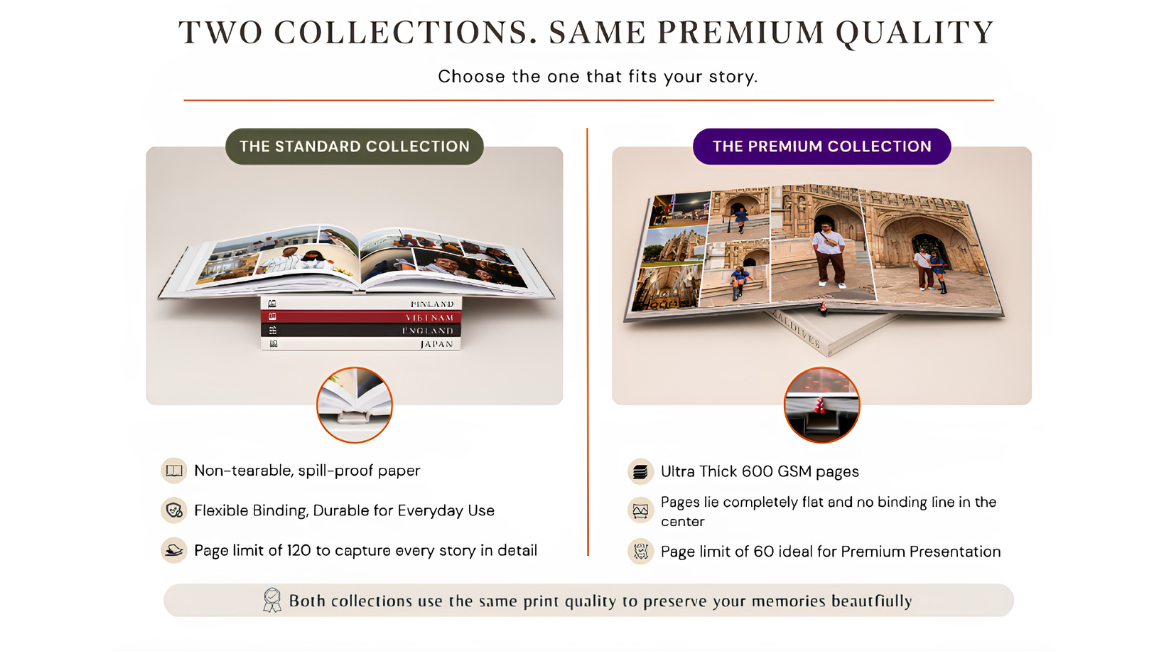
An Essentials album usually serves you well if:
- You have a lot of photos and want to tell the complete story of the trip. Essentials supports up to 120 pages and can comfortably accommodate 200–300 photos.
- Your trip includes a mix of moments like sightseeing, food, portraits, and everyday memories.
- You want a durable album that's made to be shared and revisited often. (TinyBooks' Essentials albums use 230gsm non-tearable, spill-proof paper, support 20–120 pages, and start at ₹2,500.)
A LayFlat album (Premium Collection) is worth the difference if:
- You want a curated coffee-table book featuring only the best moments from your trip.
- You're working with a smaller selection of around 120–150 photos.
- You have landscapes, panoramas, or hero shots that deserve full-spread layouts without losing part of the image in the centre fold. (TinyBooks' Premium LayFlat albums use ultra-thick 600gsm lustre pages with matte lamination, support 20–60 pages, and start at ₹3,000.)
A simple rule of thumb: Choose Essentials if you want to preserve more of the trip. Choose LayFlat if you want to showcase the best of it.
Why people make travel albums in the first place
It's worth stepping back to the reason any of this matters.
The photos on your phone exist to be revisited — and mostly, they aren't. They sit in a folder you scroll past, competing with screenshots, forwards, and receipts.
A printed album is simply the version of the trip you'll actually return to. The thing you pick up on an anniversary, hand to relatives visiting for the weekend, or open years later when the details have softened, the small café near the station, the walk you took on the last evening as you said goodbye to the city.
Something changes when a trip becomes an object you can hold rather than a file you have to go looking for.
Which tool or service you use matters far less than that outcome. Whether an algorithm arranges it, a designer builds it, or you go the concierge route, the point is the same: turning a folder of files into something you'll want to open again. That's the part worth getting right.
Common questions
Fewer than you'd think. A tight, enjoyable album is usually built from a fraction of what you shot, often 60–100 well-chosen images tell a trip's story better than 300 crammed in. The photos you think are your best (sharp, well-composed) aren't always the ones you love years later, the imperfect, candid ones often win. If choosing feels overwhelming, a service with selection support can do that narrowing with you.
It depends on the route: AI builders can build a book in minutes. Custom design can take often weeks of revisions and involve the hassle of finding the right designer and print partner. Concierge service comes in between. With TinyBooks, the first design is shared within 48 hours of receiving your photos; once approved, the album is printed and delivered in 7–9 days.
It varies with size, page count, and binding. As a reference: TinyBooks' Essentials albums start at ₹2,500. The thicker LayFlat albums start at ₹3,000. Both come with free delivery across India; larger sizes and more pages add to this cost. It's worth matching the format to your photos rather than defaulting to the most expensive option.
Not necessarily. Many tools assume you'll arrive with your final selection already made. A concierge-style service can help you narrow an unsorted set down to the images that belong in the book. If sorting through everything is the thing stopping you, that support is often what gets the album actually made.
Thanks for reading.
Ready to create your own?